

What We Learned Migrating Client Projects to the Next.js App Router
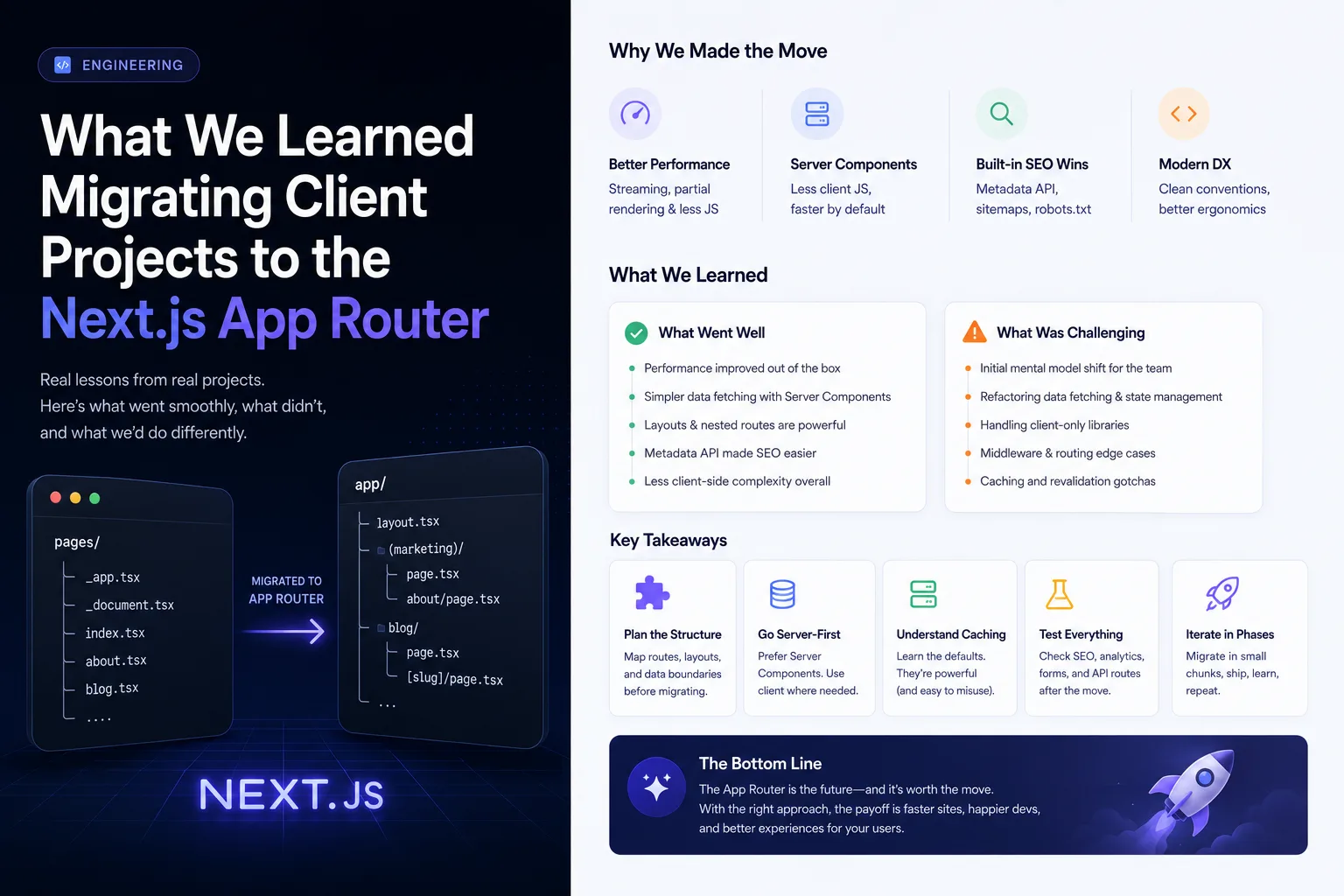
We've now migrated enough client projects from the Pages Router to the App Router to have a clear-eyed view of where it earns its keep and where it adds friction that doesn't show up until you're mid-migration.
What actually got better
Server Components changed our default architecture. Data fetching moved out of getServerSideProps boilerplate and into the components that need the data, colocated instead of hoisted to the top of the page. For content-heavy marketing sites — which is most of what we build in our web design and development work — this cut a meaningful amount of prop-drilling and made components easier to move between pages without dragging their data-fetching logic along disconnected from them.
Streaming and loading.tsx replaced a lot of custom skeleton-state code. Route-level loading states that used to require manual useState juggling are now a file convention. Small thing, but it removes a whole category of "did we handle this edge case" bugs.
Layouts stopped re-rendering on navigation. Persistent layouts (headers, sidebars) that don't remount between route changes was something we used to hand-roll with custom _app.tsx logic. It's now the default behavior.
What broke or got harder
Client/server boundaries are a real cognitive load at first. Every team we've migrated has shipped at least one "use client" directive in the wrong place in the first two weeks — usually a component that didn't need interactivity getting marked client-side because a hook was imported somewhere in its tree, quietly bloating the client bundle.
Third-party libraries lagged. Several analytics and A/B testing SDKs we rely on assumed a Pages Router mental model and needed wrapper components before they'd work cleanly inside Server Components. Budget time for this — it's rarely zero.
Caching semantics took real effort to internalize. The App Router's default fetch caching behavior surprised more than one team mid-migration — data that should have been fresh on every request stayed stale until we were explicit about cache options. This is the single most common bug category we see in App Router migrations that weren't done by a team who'd shipped one before.
What we'd do differently next time
- Migrate route-by-route, not all at once. The App Router and Pages Router can coexist in the same project. Moving one route at a time kept every PR reviewable and let us catch caching surprises in isolation instead of all at once.
- Audit third-party dependencies before starting, not during. A single incompatible SDK discovered mid-migration cost us more time than the rest of the migration combined on one project.
- Write down caching rules explicitly, even where defaults are correct. Future engineers on the project shouldn't have to reverse-engineer why a fetch call has a particular cache option — a one-line comment saves the next person a debugging session.
Is it worth migrating an existing project?
If the project is actively growing and the team is going to be touching data-fetching logic regularly anyway, yes — the architecture pays for itself within a few months. If it's a stable project in maintenance mode, we usually recommend waiting until a larger feature forces significant changes anyway, and migrating alongside that work instead of as a standalone project.
Web Design & Development
Fast, accessible sites engineered for search and built to scale.
Learn more →More from the blog.

Get insights delivered monthly.
One email a month — no fluff, just what we're learning from building software for clients.